# Troubleshooting SD-card Mode
This guide will walk you through some easy steps in case your kit is not collecting data on SD-card mode.
## Check if your kit is storing data
1. Plug in your kit with the USB cable provided. A LED on the **blue side** of the kit should light up.
{:style="max-width: 500px;"}
2. Check if the LED is...
+ ***Hard flashing pink light*** . In this case, your kit **IS NOT** storing data.
+ ***Soft fading pink light*** with either orange or green intermitent light . In this case, your kit **IS** storing data.
+ ***A single pink light with less frequency*** . Your kit **IS** storing data.
3. If your kit is **NOT** storing data, you need to [follow the steps below](#restart-data-recording) using a mobile phone
!!!info "LED colors in SD-card mode?"
Below you have a summary of all the possibilities:
| LED color | Kit status |
|------------------------------------------|------------------------------------------- |
| | :thumbsup: Collecting data offline |
| | :warning: Warning. Collecting data but not storing it in sdcard |
| | ❌ Error. Not collecting data |
| | :battery: Collecting data offline but battery is low, charge the Kit |
| | :battery: Collecting data offline, battery charging |
| | :battery: Collecting data offline, battery charged |
| | :bed: Sleep-mode. Collecting data offline and saving battery |
## Restart data recording
1. Press the **ON/OFF button** on the SCK. The ON/OFF Button is inside the box, next to the USB cable:
{:style="max-width: 500px;"}
2. The LED from before should now be **red**.
3. Next, enable Wi-Fi on your phone:
+ If you are using an iPhone, tap **Settings** > **Wi-Fi**.
+ If you are using an Android device, swipe down from the top of your screen to open the Quick Settings menu. Otherwise, look for the Wi-Fi menu in the phone settings.
!!!info ""
Your device searches for available Wi-Fi networks and displays them in a list. The kit will appear as `SmartcitizenXXXX`. The last four digits will match the four digit code printed on the kit (on the blue face of the outside, on the gray box inside the box, or both). For example: `SmartcitizenA0D1`.
4. Tap the name of the network, then wait for a welcome page to appear.
!!!warning ""
If the captive portal page doesn’t appear or you accidentally closed the page, you can force it to reopen by typing `sck.me` in the any browser search field.
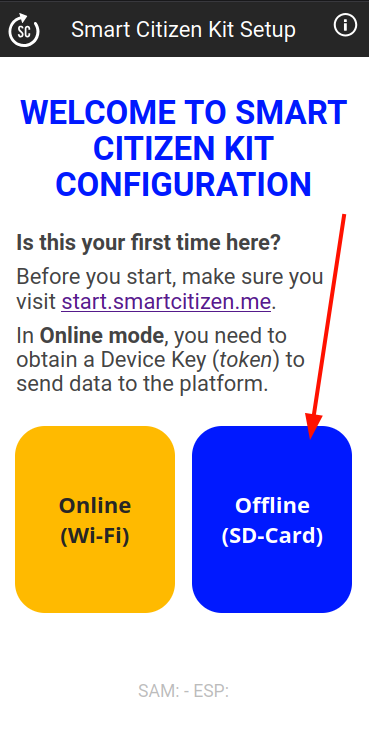
5. Now, you can press on the "Offline mode (SD-Card)" button:
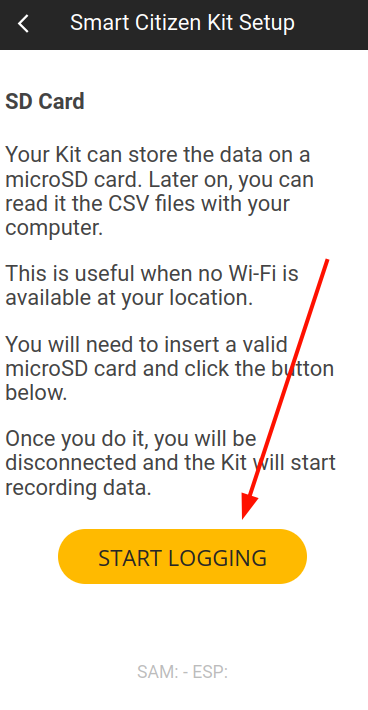
 6. And then "Start logging" button:
 7. The LED should be ***Soft fading pink light*** in any of the modes below. Below you have a summary of all the possibilities:
| LED color | Kit status |
|------------------------------------------|------------------------------------------- |
| | :thumbsup: Collecting data offline |
| | :battery: Collecting data offline, battery charging |
| | :battery: Collecting data offline, battery charged |
!!!success
You are done!