Handling calibration data
This guide will help you manage the calibration data for your units. Some sensors perform the data processing on the sensor itself, but other sensor types need more advanced computation that cannot be done in the Smart Citizen Data Board. The table below summarises when you will need to store this calibration data on our platform for it to be processed automatically:
| Sensor type | Processing data | Calibration data |
|---|---|---|
| Basic environmental metrics (T, H, P, Light) | On the sensor | None |
| Noise | On the sensor | None |
| tVOC, eCO2 | On the sensor | None |
| Particulate Matter | On the sensor | None |
| CO2 | On the sensor | None |
| Air Quality electrochemical sensors | On the platform | Based on the hardware ID (see below) |
| Water Quality sensors | On the sensor | None |
How to store calibration data
Warning
Only do this once you have finished setting up your kit. Remember that this process is only needed in case your sensors require calibration (air quality sensors such as CO, NOx, SO2, H2S, OX, and sometimes CO2). This is not necessary for water sensors. If you are using water sensors, follow instructions on each sensor knowledge page.
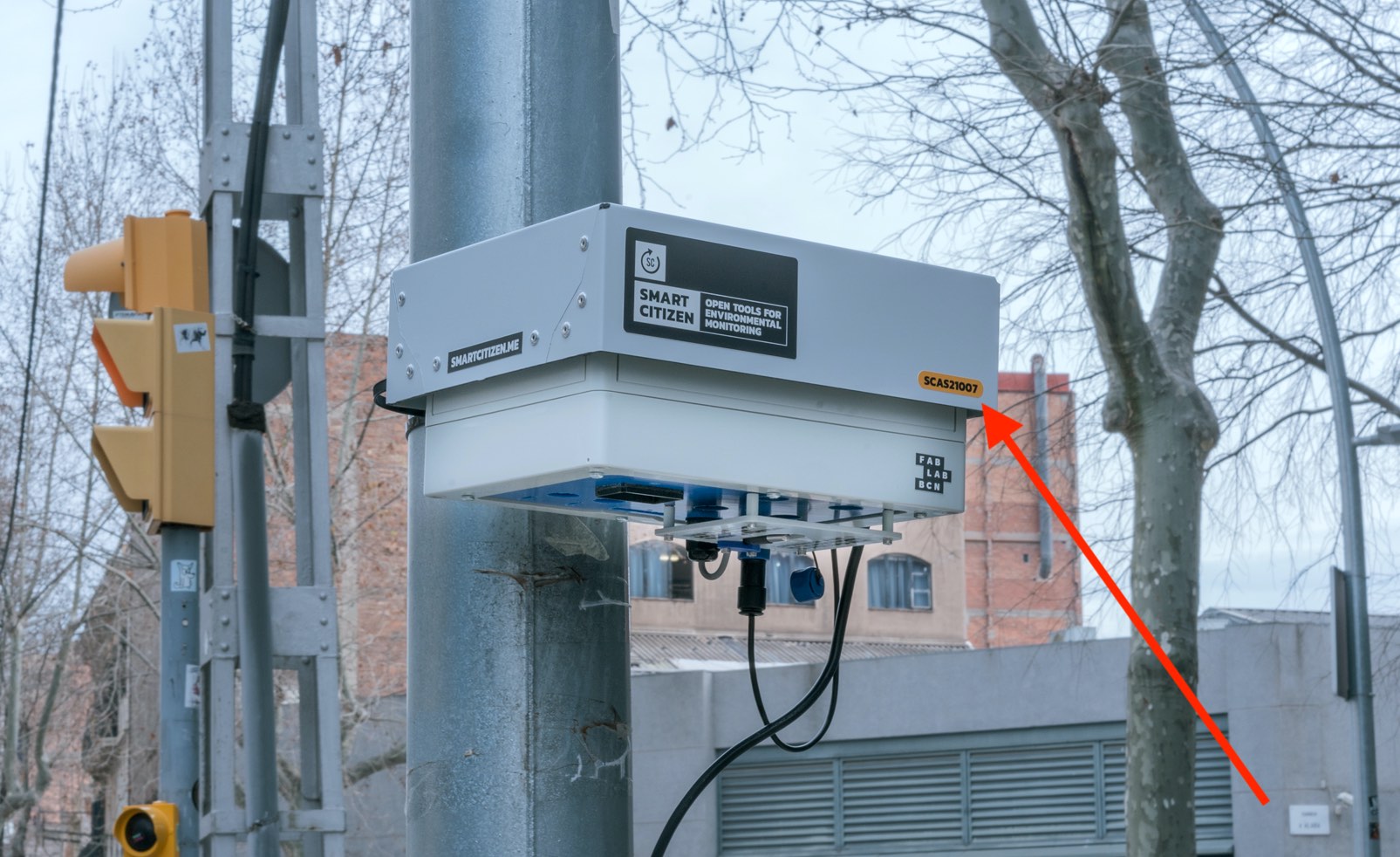
The calibration data for is managed by a unique hardware ID, and should be visible on the device itself (on a yellow sticker, normally on the form of SCAS21000X) as seen below:
Danger
This hardware ID is not the same as the kit ID. The kit ID is the number you have after the smartcitizen.me/kits url where you see the data of your kit. The hardware ID is the one in the sticker. The hardware ID is meant to never change, while the kit ID can change as you can register your kit many times!
The easiest way to store this ID is to visit your kit and click on the EDIT button:
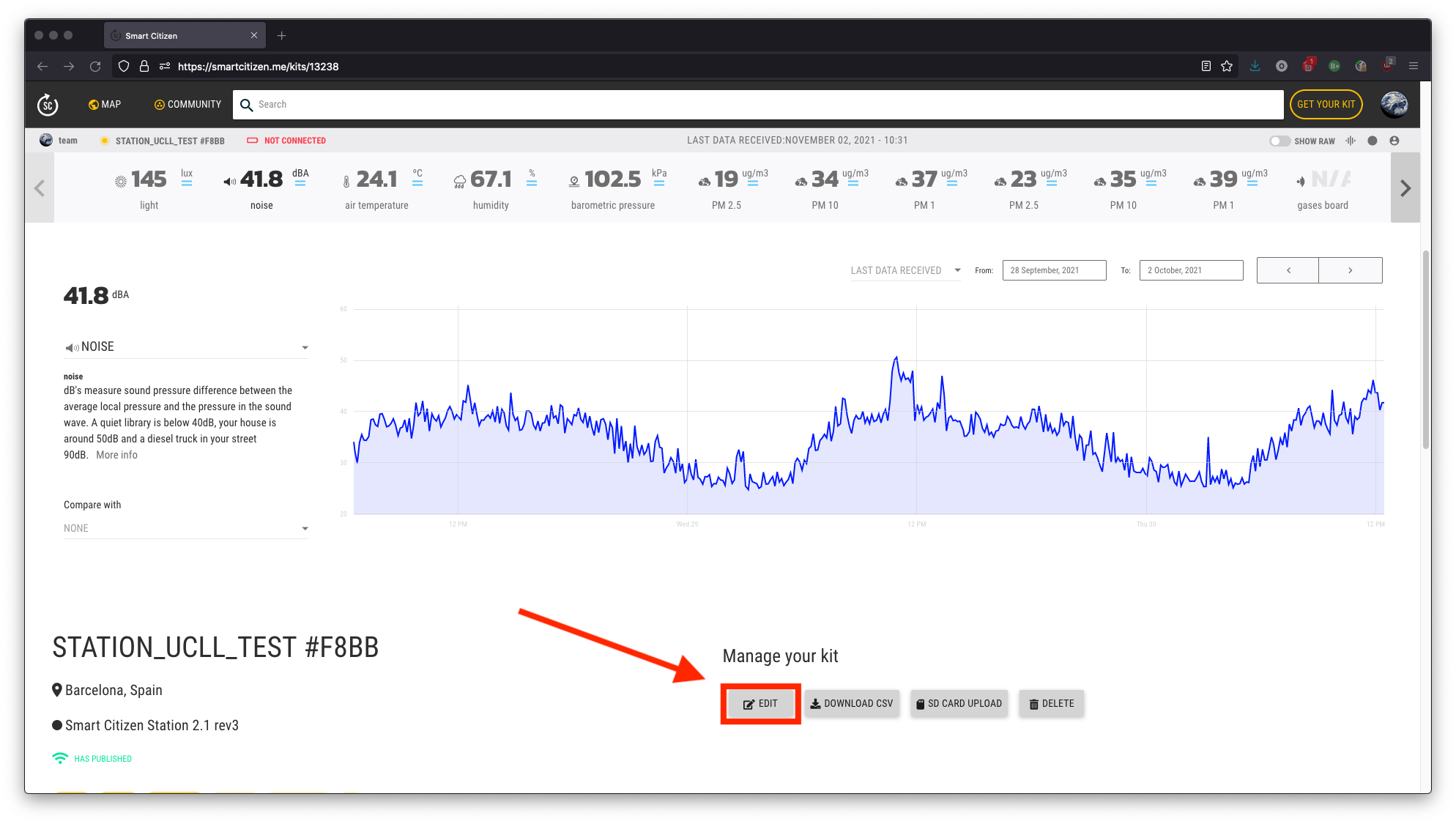
Then, in hardware URL field, introduce the number in the yellow sticker. Save your work and you are done!

Advanced features
Warning
Only read this if you are working on the data post-processing of the sensors, or you know what all this means!
The hardware ID identifies a hardware description in Smart Citizen Flows, the service that processes the data of the devices. You can see it in https://flows.smartcitizen.me/api/v1/hardware/<HARDWARE_ID>, for instance:
{
  "name": "SCAS210022",
  "blueprints": ["sc_air"],
  "description": "1PMS5003-2ELEC-AFE",
  "comment": null,
  "forwarding": null,
  "parameters": {},
  "versions": [
    {
      "ids": {
        "AS_48_32": "214240830",
        "AS_49_10": "212741109",
        "PT_49_23": "10-001222"
      },
      "from": "2021-02-08",
      "to": null
    }
  ],
  "url": "https://flows.smartcitizen.me/api/v1/hardware/SCAS210022.json"
}
blueprints: the blueprints that define how the data is processed. These are our default algorithms, for instancesc_airfor the Smart Citizen air quality stations. Check the data processing guide for more details.description: brief description of the hardware.versions: list of hardware versions, in case sensors were replaced, but kept in the same physical unit. Each version has the dates during which it was valid (fromandto,nullif it is still valid), and theidsof its sensors.- The other fields (
parameters,commentandforwarding) are explained in the data processing guide.
In the versions, each sensor is stored by its id, with a key that tells its type and where it is connected. For example:
AS_48_32: Alphasense electrochemical sensor, connected to the ADC with address0x48, with the Working Electrode connected to the channel 3 of the ADC, and the Auxiliary Electrode connected to the channel 2 of the ADC. The logic is explained below:ASrefers to Alphasense. This implies that the rest of the name is going to be on the formatX_YZ48refers to the ADC (analog to digital converter) I2C address. Since we only store the raw data values from the ADC, we use the ADC I2C address to refer to the needed channels32are the two channels from the ADC in question that are used for measuring the WE and AE from the Alphasense sensor
PT_49_23: PT1000 temperature probe of an Alphasense AFE board, connected to the channels 2 and 3 of the ADC with address0x49. Its value is the id of the AFE board.
The calibration data of each sensor (provided by Alphasense) is stored in Flows too, and can be checked in https://flows.smartcitizen.me/api/v1/calibrations/<SENSOR_ID>.
Who manages this?
The hardware descriptions, blueprints and calibrations are managed by us. If you have received a unit with a hardware ID, its hardware description is already in Flows. If something is wrong or missing, contact us.
Alternative method
Alternatively, in order to store the hardware ID in your device, you can follow two other methods:
- either send us the kit ID and its corresponding hardware ID, and we will do this for you
- or, if you are familiar with
http requests, you canPATCHyour device as such:
curl 'https://api.smartcitizen.me/v0/devices/<DEVICE-ID>' -X PATCH -H 'Authorization: Bearer <BEARER-FROM-YOUR-USER-PROFILE>' -H 'Content-Type: application/json;charset=UTF-8' --data-binary '{"postprocessing_attributes": {"hardware_url": "<HARDWARE_ID>"}}' --compressed
You can get your authorization token on your user profile page in the OAuth section. Make sure to change the following fields in the command above:
<DEVICE-ID><BEARER-FROM-YOUR-USER-PROFILE><HARDWARE_ID>, for instanceSCAS210002
The blueprints are taken from the hardware description: a blueprint_url in the device is not used.
Check it out
Once this process is done, you should be able to check that the postprocessing is safely stored in the Platform by visiting: https://api.smartcitizen.me/v0/devices/<DEVICE-ID>/. After this, we will take care of processing the data in a periodic way.