AMS AS7341
The AS7341 is an 11-channel spectral sensor by ams OSRAM. You can use it to measure the color composition of light, from violet to near infrared, and to detect light flicker.
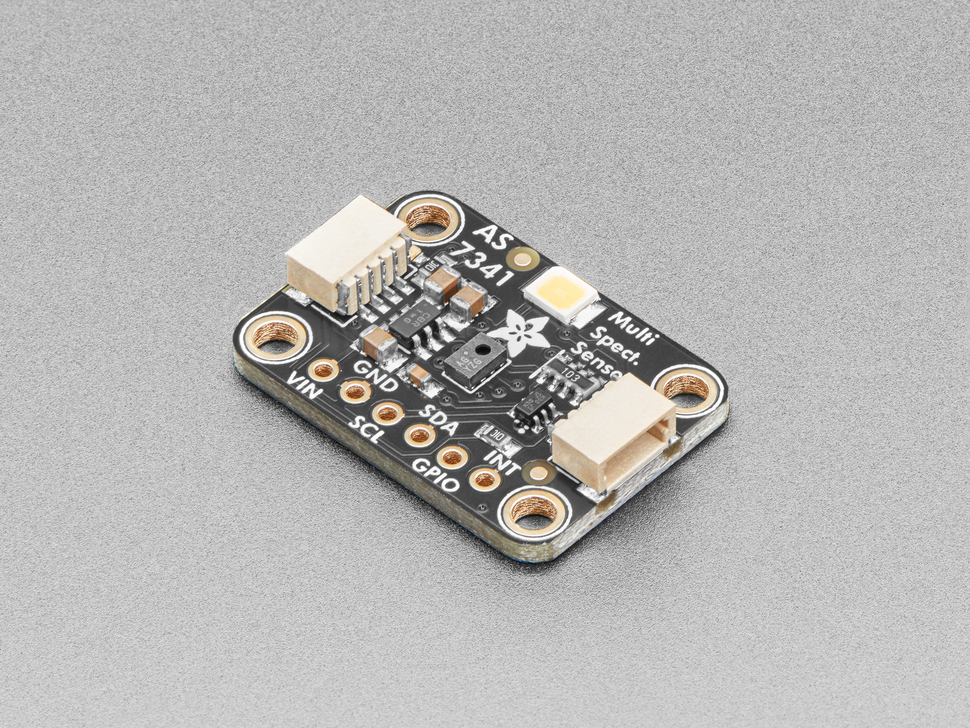
Image Credit: Adafruit
Firmware version
The AS7341 is supported from firmware V0.9.12 onwards, and it is enabled by default in the sck23_air firmware build. Check how to upgrade the firmware if you have an older version.
Usage
The easiest way to connect the AS7341 to the SCK is by using the Adafruit AS7341 breakout. This board has two STEMMA QT connectors, so you can connect it to the Auxiliary connector on the data board with a STEMMA QT to Grove cable. Other breakouts (for instance, by DFRobot or Waveshare) can be connected with 4-wire grove to female header cables or a grove to screw connector.
The sensor communicates via I2C, on the address 0x39. Once connected, it will be automatically detected on boot, and the following metrics will be available:
| Metric | Shell name | Center wavelength | Color |
|---|---|---|---|
| F1 | AS7341 415nm |
415 nm | Violet |
| F2 | AS7341 445nm |
445 nm | Indigo |
| F3 | AS7341 480nm |
480 nm | Blue |
| F4 | AS7341 515nm |
515 nm | Cyan |
| F5 | AS7341 555nm |
555 nm | Green |
| F6 | AS7341 590nm |
590 nm | Yellow |
| F7 | AS7341 630nm |
630 nm | Orange |
| F8 | AS7341 680nm |
680 nm | Red |
| Clear | AS7341 Clear |
- | Visible (broadband) |
| NIR | AS7341 NIR |
~910 nm | Near infrared |
| Flicker frequency | AS7341 Flicker Freq |
- | Hz |
| Flicker amplitude | AS7341 Flicker Peak to Peak |
- | - |
You can check the readings with the read and monitor commands, for instance:
read as7341 555nm
monitor as7341 415nm
read as7341 flicker freq
Placement
The sensor measures the light that reaches it, so think about where it is pointing to. Pointing it towards the sky, a lamp or a wall will give very different results. If you place it inside an enclosure, make sure the window in front of it is transparent and does not filter some of the colors.
Working principle
The AS7341 is a multi-spectral sensor: instead of measuring the total amount of light (like an ambient light sensor), it measures the light in several narrow bands of the spectrum. To do this, it has an array of photodiodes, each one covered with an interference filter deposited directly on the chip (nano-optic filters), that only lets a certain band of wavelengths through. Each band is around 30-50 nm wide, and together they cover the visible spectrum from violet to red 1. The spectral response of each channel can be found in the datasheet.
Additionally, it has a clear channel (no filter, broadband visible light), a near infrared channel (NIR), and a dedicated flicker detection photodiode. The signal from each photodiode is integrated by one of six 16-bit ADCs, which are internally connected to the photodiodes through a multiplexer (SMUX). Since there are more channels than ADCs, the sensor reads all the channels in two consecutive steps.
With the information of all the channels, it is possible to estimate the color composition of the light, which can be used, for example, to:
- Compare natural and artificial light sources, or different types of lamps (incandescent, fluorescent, LED...)
- Estimate color temperature or color coordinates (after calibration)
- Study light conditions for plants and growing setups
- Carry out color measurements of surfaces or liquids, with a controlled light source (the Adafruit breakout includes a white LED for this)
- Detect light flicker of artificial lighting
Usage and considerations
The datasheet and application notes are available on the manufacturer's website. Adafruit's guide is also a very good introduction to the sensor.
Spectral readings
The amount of signal that each channel produces depends on two settings: the integration time (how long the photodiodes collect light) and the gain of the ADC. The firmware handles both automatically:
- The integration time is fixed at ~281 ms
- The gain is automatic. The sensor starts at the maximum gain (512x), and if any channel is saturated, it tries again with a lower gain (up to three attempts). This allows the sensor to work both in dim indoor environments and under brighter light
- To avoid reading the sensor too often, the spectral readings are refreshed at most every 5 seconds
The raw readings are then converted to basic counts: the raw value divided by the gain and the integration time, so that readings taken with different settings are comparable. Finally, the eight color channels (F1 to F8) are multiplied by a correction factor for each channel, that compensates for the different sensitivity of each photodiode, following the manufacturer's spectral sensor calibration methods application note. The clear and NIR channels are not corrected.
Units
The readings are dimensionless (normalised counts), not radiometric units like W/m2 or photometric units like lux. They are useful for comparing channels between them (the shape of the spectrum), or the same channel over time, but not directly comparable to other instruments. To obtain absolute values, the sensor needs to be calibrated against a reference spectrometer with a known light source.
Flicker detection
Many artificial light sources do not emit a constant amount of light, but flicker at a frequency related to the electrical grid (typically 100 Hz in countries with a 50 Hz grid, and 120 Hz in countries with a 60 Hz grid), or to the electronics that drive them (for instance, the PWM used to dim LEDs). This flicker is generally not visible, but it has been related to discomfort, headaches and visual fatigue.
The firmware uses the flicker photodiode to capture 128 samples of the light signal at around 514 samples per second (~0.25 seconds of data). Then, it calculates the frequency spectrum of the signal (FFT) and reports:
- Flicker frequency: the dominant frequency of the light variation, in Hz. The resolution of this measurement is ~4 Hz
- Flicker peak to peak: the amplitude of the light variation (maximum minus minimum) during the capture, in basic counts. A larger value means a stronger flicker
Flicker limitations
Given the sampling rate, the sensor can only measure flicker frequencies up to ~257 Hz. Faster flicker (for instance, from some LED drivers) will appear at a wrong, lower frequency (aliasing). Additionally, if there is no flicker at all (for instance, in daylight), the reported frequency is not meaningful, and the peak to peak value should be used to evaluate if there is any significant flicker.
Performance
| Property | Value |
|---|---|
| Sensor type | Multi-spectral sensor with digital interface (I2C) |
| Channels | 8 visible (415 - 680 nm), clear, NIR and flicker detection |
| ADC | 6 x 16-bit, gain from 0.5x to 512x |
| Integration time (SCK) | ~281 ms |
| Flicker detection (SCK) | Up to ~257 Hz, ~4 Hz resolution |
| Deployment type | Indoor/outdoor (needs a transparent enclosure for outdoor use) |
Limitations
- The readings are not calibrated in absolute units, and each sensor has a slightly different response, so comparing different units requires a calibration
- The filters' response depends on the angle at which light reaches the sensor. Light coming from the sides will be measured differently than light coming straight at it. Diffusers can help with this
- The channels are not perfectly narrow: each filter also lets a small amount of light from other wavelengths through, so reconstructing a full spectrum from the eight channels is an approximation
- Very bright sources (like direct sunlight) can saturate the sensor even at the lowest gain used by the firmware
- Being an optical sensor, dust or water on top of the sensor (or the enclosure window) will affect the readings
Resources
References
-
ams OSRAM. “AS7341 11-Channel Multi-Spectral Digital Sensor - Datasheet.” https://ams-osram.com/products/sensor-solutions/ambient-light-color-spectral-proximity-sensors/ams-as7341-11-channel-spectral-color-sensor. ↩