Sensirion SCD4X
The SCD4X (SCD40 and SCD41) is a miniature photoacoustic NDIR CO2 sensor by Sensirion. You can use it to measure CO2 in indoor spaces, in mobile setups, or for experiments where you need to know an accurate CO2 level.
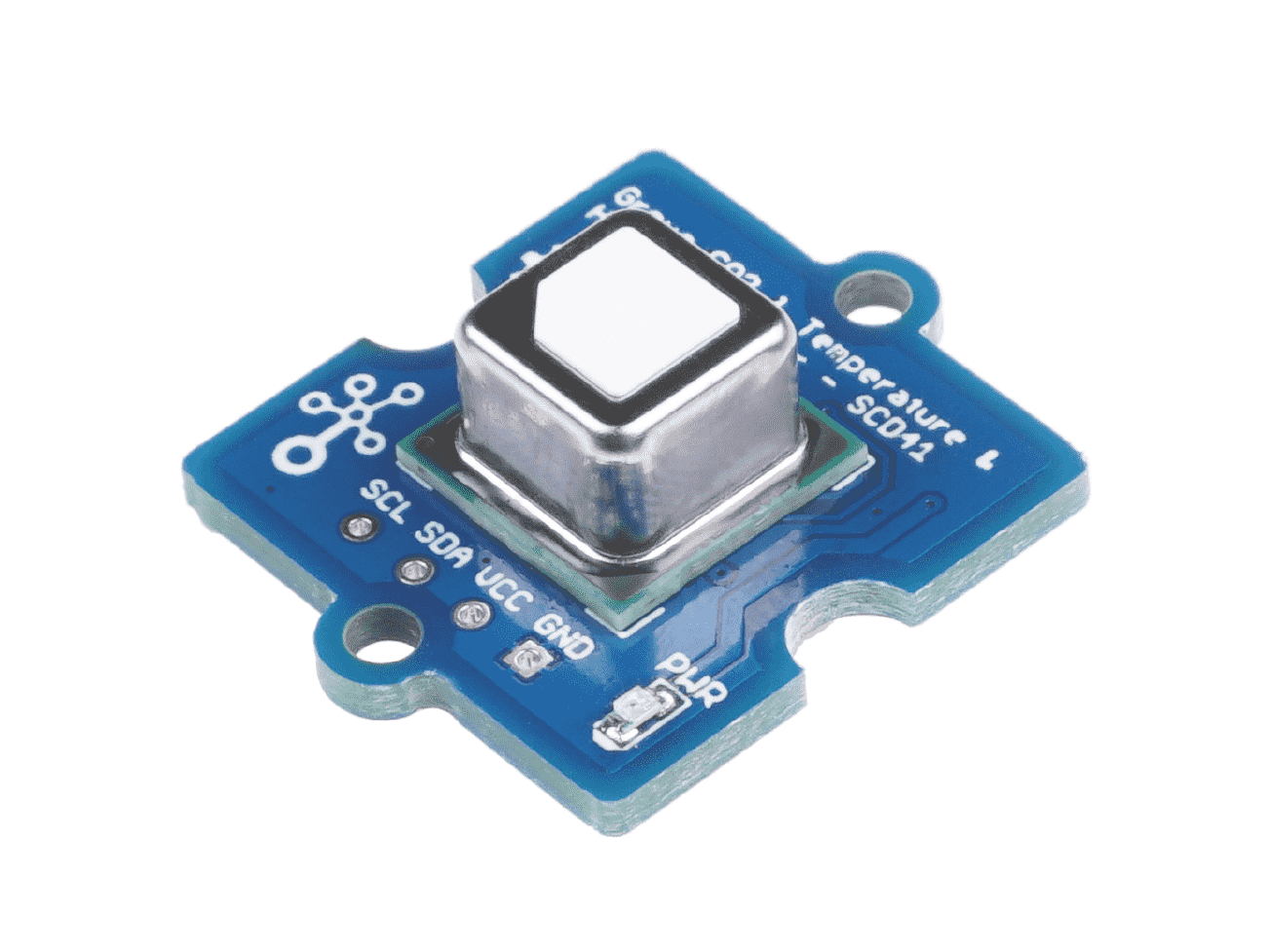
Image Credit: Seeed Studio
Firmware version
The SCD4X is supported from firmware V0.9.12 onwards, and it is enabled by default in the sck23_air firmware build. Both the SCD40 and the SCD41 are supported. Check how to upgrade the firmware if you have an older version.
Working principle
The SCD4X is also an NDIR (non-dispersive infrared) sensor, but unlike the SCD30, which is a transmissive NDIR sensor, the SCD4X uses a photoacoustic measurement principle (PASens® technology by Sensirion) 4.
In a photoacoustic NDIR sensor, an infrared emitter shines pulses of light at the wavelengths absorbed by CO2 (around 4.2μm) into a small measurement chamber. CO2 molecules absorb part of this energy and heat up, and since the light is pulsed, the gas expands and contracts periodically, creating a pressure wave: sound. A small MEMS microphone inside the chamber picks up this pressure wave, and its amplitude is proportional to the amount of CO2 in the chamber 2 5.
The main advantage of this approach is that it does not need a long optical path between the emitter and the detector, nor a careful alignment between them. This allows for a much smaller sensor (10.1 x 10.1 x 6.5 mm, compared to 35 x 23 x 7 mm for the SCD30) that is less sensitive to mechanical stress, which makes it a better candidate for mobile or wearable setups.
As with the SCD30, the module also integrates a Sensirion humidity and temperature sensor, used to compensate the CO2 readings internally.
Usage and considerations
Connection
The easiest way to connect the SCD4X to the SCK is by using the Seeed Studio Grove breakout (SCD41). The sensor can be directly connected to the Auxiliary connector on the data board, using a 4-wire grove cable.
Other breakouts (Sensirion's evaluation boards, Adafruit, Sparkfun...) can be connected using 4-wire grove to female header cables, or a grove to screw connector. The sensor communicates via I2C, on the address 0x62.
Once connected, the sensor will be automatically detected on boot, and three metrics will be available:
| Metric | Shell name | Units | API |
|---|---|---|---|
| CO2 | SCD4X CO2 |
ppm | 258 |
| Temperature | SCD4X Temperature |
ºC | 259 |
| Relative humidity | SCD4X Humidity |
% | 260 |
I2C address conflict
The SCD4X uses the I2C address 0x62, which is the same one used by the Atlas Scientific ORP sensor. Both sensors cannot be used at the same time on the same SCK. Note that the SCD30 uses a different address (0x61), so the SCD30 and SCD4X can be used together.
Considerations
Sensirion provides all the documentation for the SCD4X in their product page, including the datasheet, application notes and design-in guidelines. There are two variants in the SCD4X family, with the same footprint and commands:
- SCD40: optimised for the 400 - 2000 ppm range, for indoor air quality and ventilation applications.
- SCD41: extends the range to 400 - 5000 ppm, and also supports a single shot measurement mode for low power applications.
The firmware detects which variant is connected when the sensor starts.
Sensor placement
Even if the SCD4X is less sensitive than the SCD30 to mechanical stress, the sensor needs good exposure to the environment and should not be placed next to heat sources. Check Sensirion's design-in guidelines before placing it inside an enclosure.
Operation modes
The SCK operates the SCD4X in periodic measurement mode, in which the sensor takes a new reading every 5 seconds, regardless of the SCK's reading interval. Whenever the SCK needs a reading, it takes the latest measurement from the sensor. When all the SCD4X metrics are disabled, the sensor is powered down.
No interval command
Unlike the SCD30, the SCD4X does not have a configurable reading interval in the firmware.
All the commands for the sensor are accessed by:
SCK > control scd4x
SCD4X CO2:
Options:
autocal [on/off]
calfactor [400-2000 (ppm)]
caltemp [newTemp,off]
factory
You can also check the readings with the read and monitor commands:
read scd4x co2
read scd4x temperature
read scd4x humidity
Performance
| Property | Value |
|---|---|
| Probe type | Photoacoustic NDIR with digital interface. Not waterproof without enclosure |
| Measurement range | 400 ppm – 2.000 ppm (SCD40), 400 ppm – 5.000 ppm (SCD41) specified. Output range 0 – 40.000 ppm |
| Accuracy (SCD40) | ±(50 ppm + 5% of reading) from 400 to 2.000 ppm |
| Accuracy (SCD41) | ±(50 ppm + 2.5% of reading) from 400 to 1.000 ppm, ±(50 ppm + 3% of reading) from 1.001 to 2.000 ppm, ±(40 ppm + 5% of reading) from 2.001 to 5.000 ppm |
| Temperature range | -10 ºC – 60 ºC (±0.8 ºC from 15 to 35 ºC) |
| Humidity range | 0 – 100 %rh (±6 %rh from 15 to 35 ºC and 20 to 65 %rh) |
| Reaction Time | 63% in 60s (periodic measurement) |
| Sampling interval | 5s (periodic measurement) |
| Size | 10.1 x 10.1 x 6.5 mm |
| Deployment type | indoor/outdoor (mostly indoor). Sensor provides auto compensation for drift. |
Check the latest datasheet
The specifications above are taken from the manufacturer's datasheet at the time of writing. Check the product page for the latest values.
Calibration
Like the SCD30, the SCD4X can work in two main calibration modes: ASC (automatic self-calibration) or FRC (forced re-calibration). Both modes shift the sensor baseline, only that FRC requires an external reference value, while ASC adapts over time looking for "clean air" readings.
Additionally, a temperature offset can be set to compensate the self-heating of the sensor and its surroundings. This only affects the temperature and humidity readings, not the CO2 accuracy.
Settings are stored in the sensor
The firmware stores the ASC and temperature offset settings in the sensor's internal memory (EEPROM), so that they are kept after a power cycle. This memory has a limited number of write cycles (around 2000 according to the manufacturer), so avoid changing these settings in a loop or automated script.
ASC
The SCD4X comes with ASC enabled by default. In this mode, the sensor tracks the lowest CO2 readings over time and assumes that they correspond to fresh outdoor air (400 ppm). By default, the first ASC correction happens after 44 hours of operation and subsequent corrections every 156 hours (~6.5 days).
Some considerations, similar to the SCD30:
- The sensor needs to be operated continuously (periodic measurement mode, which is what the SCK does) for ASC to work. Avoid unplugging the sensor during the first ASC periods
- The sensor needs to be exposed to fresh air (~400 ppm) at least once during each ASC period. Indoor environments that are never ventilated are not a good place for this
- Do not trust the initial values, as the self-calibration algorithm might not have found proper values yet
- The intention of ASC is mainly to correct sensor drift due to aging
To check the current status:
SCK > control scd4x autocal
SCD4X CO2: autocal
Auto Self Calibration: on
To turn it on:
control scd4x autocal on
Or off:
control scd4x autocal off
FRC
To use FRC, we need to provide an external CO2 concentration in ppm, measured with a reference instrument. FRC calibration takes place immediately, and it can be done multiple times at arbitrary intervals. Before applying it, run the sensor for at least 3 minutes in the target environment, with stable CO2 levels.
Unstable environments
Take into account the response time of the sensor (t63 = 60s). If the environment in which you are taking readings is too unstable, do not apply the FRC.
First, make sure both reference and SCD4X sensors are stable:
monitor scd4x co2
To stop the monitor, just press Enter.
Secondly, feed the external reading into the sensor. The value needs to be between 400ppm and 2000ppm. For instance, for a value of 450ppm:
SCK > control scd4x calfactor 450
SCD4X CO2: calfactor 450
Forced Recalibration Factor: 12
Note that the value returned is not the reference value, but the correction (in ppm) that the sensor has applied to its baseline. If the FRC fails (for instance, if the value is out of range or the sensor was not measuring), the returned value is 0.
Difference with the SCD30
The SCD4X does not provide a way to read back the last FRC value. Calling control scd4x calfactor without a value will not show the previous reference, it will only return 0.
FRC and ASC
Unlike the SCD30, applying FRC does not disable ASC. If you want to keep only your FRC correction, turn ASC off with control scd4x autocal off.
Temperature correction
The SCD4X has a temperature offset to compensate for self-heating. Sensirion sets it to 4ºC by default. An external temperature sensor can be used to adjust this value with the caltemp command.
First, read the temperature from the SCD4X, and verify it's higher than the reference sensor (the offset can only bring the temperature down):
read scd4x temperature
If it is, then feed the reference temperature value (for instance, 21.5 ºC):
control scd4x caltemp 21.5
The firmware calculates the new offset by taking into account the current reading and the previous offset, and stores it in the sensor. If the reference temperature is higher than the sensor reading, the command will fail.
To check the current temperature and offset without modifying it:
control scd4x caltemp
To set the offset to 0 (no compensation at all):
control scd4x caltemp off
This is not the factory default
caltemp off removes the offset completely, which will make the temperature readings higher than with the default 4ºC offset. To go back to the default value, use the factory reset below.
Factory reset
To reset all the sensor settings (ASC, FRC history and temperature offset) to the factory defaults:
SCK > control scd4x factory
SCD4X CO2: factory
Factory reset: OK
Insights
Some recommendations, which also apply to the SCD30:
- It is recommended to use FRC after assembly with reference data, if available
- ASC can be used instead of performing FRC after assembly, but it might leave the sensor with readings out of specification during the first days
- FRC corrects deviations caused by handling and assembly, while ASC takes care of drift due to aging. Only turn ASC off in applications where ASC conditions can't be met (for instance, spaces that are never ventilated, or greenhouses with CO2 enrichment)
For more information on how we use these modes for calibrating large batches of sensors, check the calibration process in the SCD30 page.
Limitations
NDIR CO2 sensors tend to show drift in the data signal over time, and have interferences by humidity and temperature 1, 3. These effects are compensated internally with the integrated humidity and temperature sensor, and the drift over time is corrected with the automatic-self calibration algorithm, assuming that baseline levels are constant over time.
Low-cost NDIR sensors have shown good performance in laboratory evaluations 6, 7, and photoacoustic sensors add the advantage of their smaller size and robustness to mechanical stress. However, being based on an acoustic measurement, they could be affected by strong vibrations or loud noise at certain frequencies. Additionally, changes in ambient pressure affect the measurement, since the sensor calculates the concentration assuming a certain pressure (sea level by default). The firmware does not currently set an ambient pressure compensation for the SCD4X, which can be relevant if you are using the sensor at high altitudes.
Resources
References
-
Clements, A., S. Lung, A. Arfire, AND A. Polidori. An Update on Low-Cost Sensors for the Measurement of Atmospheric Composition: Evaluation Activities. An Update on Low-Cost Sensors for the Measurement of Atmospheric Composition. World Meteorological Organization, Geneva, Switzerland, , NA, (2020). ↩
-
Dinh, Trieu-Vuong, In-Young Choi, Youn-Suk Son, and Jo-Chun Kim. “A Review on Non-Dispersive Infrared Gas Sensors: Improvement of Sensor Detection Limit and Interference Correction.” Sensors and Actuators B: Chemical 231 (August 2016): 529–38. https://doi.org/10.1016/j.snb.2016.03.040. ↩
-
Müller, Michael, Peter Graf, Jonas Meyer, Anastasia Pentina, Dominik Brunner, Fernando Perez-Cruz, Christoph Hüglin, and Lukas Emmenegger. “Integration and Calibration of Non-Dispersive Infrared (NDIR) CO2 Low-Cost Sensors and Their Operation in a Sensor Network Covering Switzerland.” Atmospheric Measurement Techniques 13, no. 7 (July 15, 2020): 3815–34. https://doi.org/10.5194/amt-13-3815-2020. ↩
-
Sensirion SCD41 Product Page (Accessed January 2023) https://sensirion.com/products/catalog/SCD41/. ↩
-
Popa, Daniel, and Florin Udrea. “Towards Integrated Mid-Infrared Gas Sensors.” Sensors 19, no. 9 (May 4, 2019): 2076. https://doi.org/10.3390/s19092076. ↩
-
Marinov, Marin B., Nina Djermanova, Borislav Ganev, Georgi Nikolov, and Emilija Janchevska. “Performance Evaluation of Low-Cost Carbon Dioxide Sensors.” In 2018 IEEE XXVII International Scientific Conference Electronics - ET, 1–4. Sozopol: IEEE, 2018. https://doi.org/10.1109/ET.2018.8549621. ↩
-
Carsen Banister, Justin Berquist, and Talal Toushan. “Evaluation of Low-Cost CO2 Sensors.” National Research Council Canada, March 14, 2019. https://publications.gc.ca/collections/collection_2021/cnrc-nrc/NR24-35-2019-eng.pdf. ↩